AI ASSISTANT
LiteAI that speaks your API's language.
Generate requests from plain English, explain response payloads, write pre-request scripts, and debug errors — all without leaving your workflow.
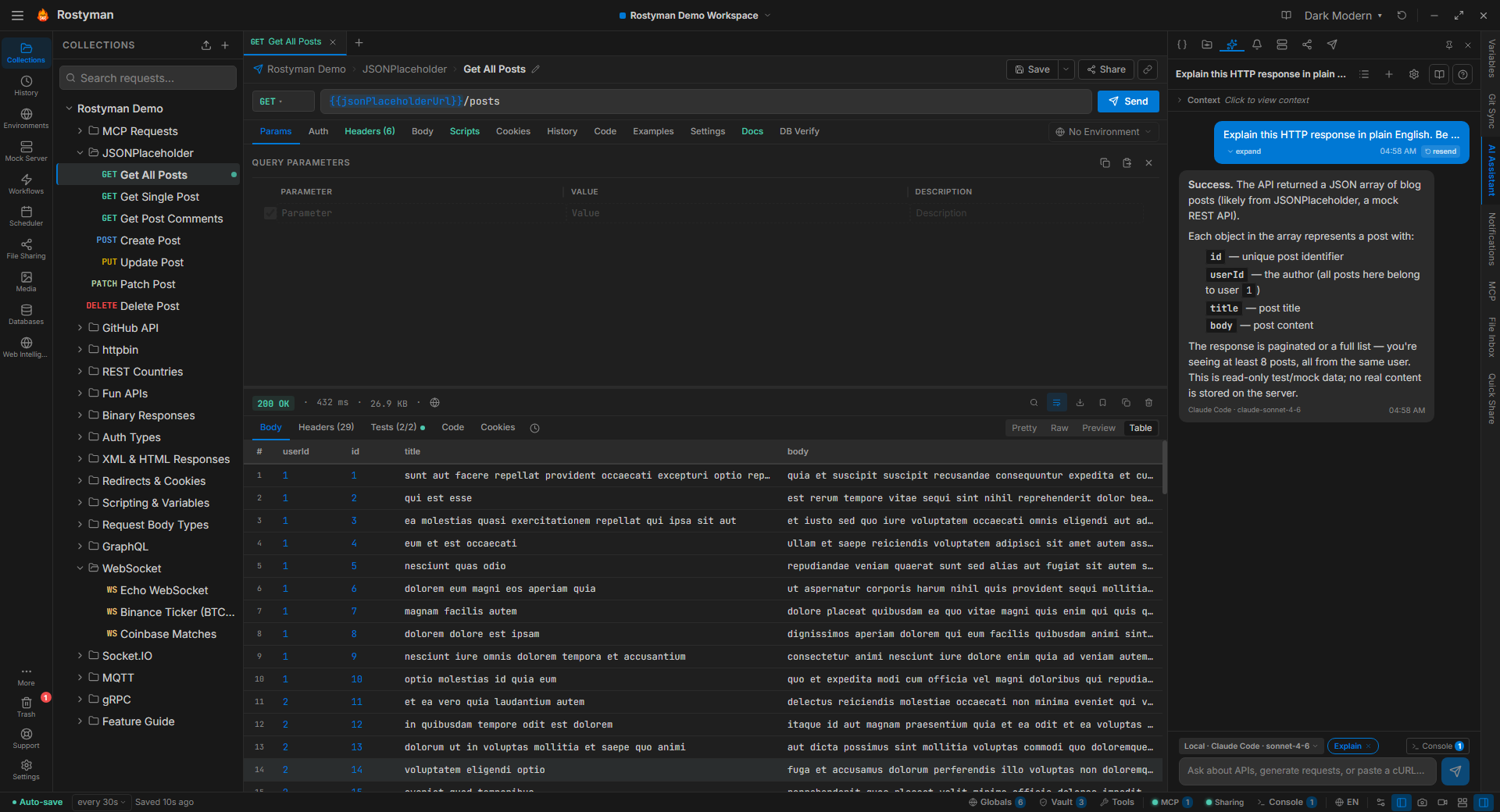
What you can do with the AI assistant
Generate requests from plain English
Describe what you want to test — "create a POST request to register a new user with email, name, and password fields" — and Rostyman builds the full request including URL, method, body schema, and headers.
Explain response payloads
Paste any response JSON or select it in the response viewer. Ask "what does this response mean?" and get a plain-English explanation of every field, including inferred types and relationships.
Write pre-request scripts
Describe the script you need — "compute an HMAC-SHA256 signature for this request" or "refresh the OAuth token if it expires in less than 5 minutes" — and get working rm.* API JavaScript you can run directly.
Debug API errors
Paste an error response, a 500 trace, or an unexpected result. The AI explains what went wrong, what the API server likely returned and why, and suggests how to fix the request.
Generate test assertions
After receiving a response, ask the AI to write post-response test scripts using the rm.test() API — asserting status, checking specific fields, validating schema structure.
Convert cURL to request
Paste any cURL command and Rostyman's AI will parse it into a complete request — method, URL, headers, body, and auth — ready to send and save.
AI tool-use — chat that builds
The assistant doesn't just answer questions about your workspace — it can edit it. Ask for a collection, a folder, a request, or a full visual workflow and it appears in your sidebar. Every action is auditable in the chat transcript.
create_collectionSpin up a new collection with name + description from a chat prompt — "make a collection for the Stripe API".
create_folderAdd a folder under any collection with a single message — useful for grouping by feature or version.
create_requestGenerate a fully-formed HTTP request — method, URL, headers, body, auth — directly into the folder you point at.
create_workflowBuild a visual workflow from a description — "OAuth login → fetch profile → call /orders". Nodes, edges, and assertions all wired.
get_collectionList the folders and requests in any collection so the assistant can reason about what already exists before adding more.
Audit-friendlyEvery tool call is logged in the chat transcript with arguments and result — undo, copy, or replay any step.
AI for databases
The same assistant is wired into the database client. It sees your live schema and uses it to write SQL that actually runs.
Plain-English → SQL or MongoDB
Ask a question in plain English; get a runnable query in your dialect — Postgres, MySQL, MSSQL, SQLite, CockroachDB, or MongoDB. The schema is the source of truth.
Schema analysis
One click audits your schema for missing indexes, missing constraints, and type mismatches with per-table recommendations.
Stored procs, functions, triggers, views
Describe behavior in English; get a CREATE statement in the right dialect, ready to run.
Generate full CRUD API collections
Pick the tables; get a complete REST collection (List / Get / Create / Update / Delete) wired to {{baseUrl}}, dropped into your sidebar.
5 AI providers — all BYO key
Your API key, your data. We never proxy your requests through Rostyman servers.
OpenAI
GPT-4o, GPT-4o Mini, GPT-4.1, GPT-4.1 Mini, o3, o4-mini
Connect with your own API key. Supports the latest models with function calling.
Requests go to OpenAI servers. Rostyman never stores your API key in plaintext.
Anthropic
Claude Opus 4.7, Claude Sonnet 4.6, Claude Haiku 4.5
Use Anthropic's Claude models. Excellent at understanding complex API structures and writing scripts.
Requests go to Anthropic servers. Rostyman never stores your API key in plaintext.
Google Gemini
Gemini 2.5 Pro, Gemini 2.5 Flash, Gemini 2.0 Flash
Use Google's Gemini models with a Gemini API key from Google AI Studio.
Requests go to Google servers. Rostyman never stores your API key in plaintext.
GitHub Copilot
GPT-4o, GPT-4.1, Claude Sonnet 4.6 via Copilot
Use your existing GitHub Copilot subscription — no separate API key needed.
Requests go to GitHub Copilot servers. Rostyman never stores your API key in plaintext.
Ollama (Local)
Any Ollama model — dynamically fetched from localhost:11434
Run AI entirely on your machine. Zero network requests. Perfect for air-gapped environments or maximum privacy.
Completely private. Nothing leaves your machine. Requires Ollama installed locally.
Already have a CLI AI tool?
Rostyman can drive Claude Code, GitHub Copilot CLI, Gemini CLI, or OpenAI Codex if they're already installed on your machine — no second API key required.
Claude Code
GitHub Copilot CLI
Gemini CLI
OpenAI Codex
Privacy guarantee
Start using AI-assisted API testing today
Bring your own API key or use a local CLI tool — included free in Rostyman Lite.
Download Free