RUNNER & CLI
LiteEvery request. In order. Every time.
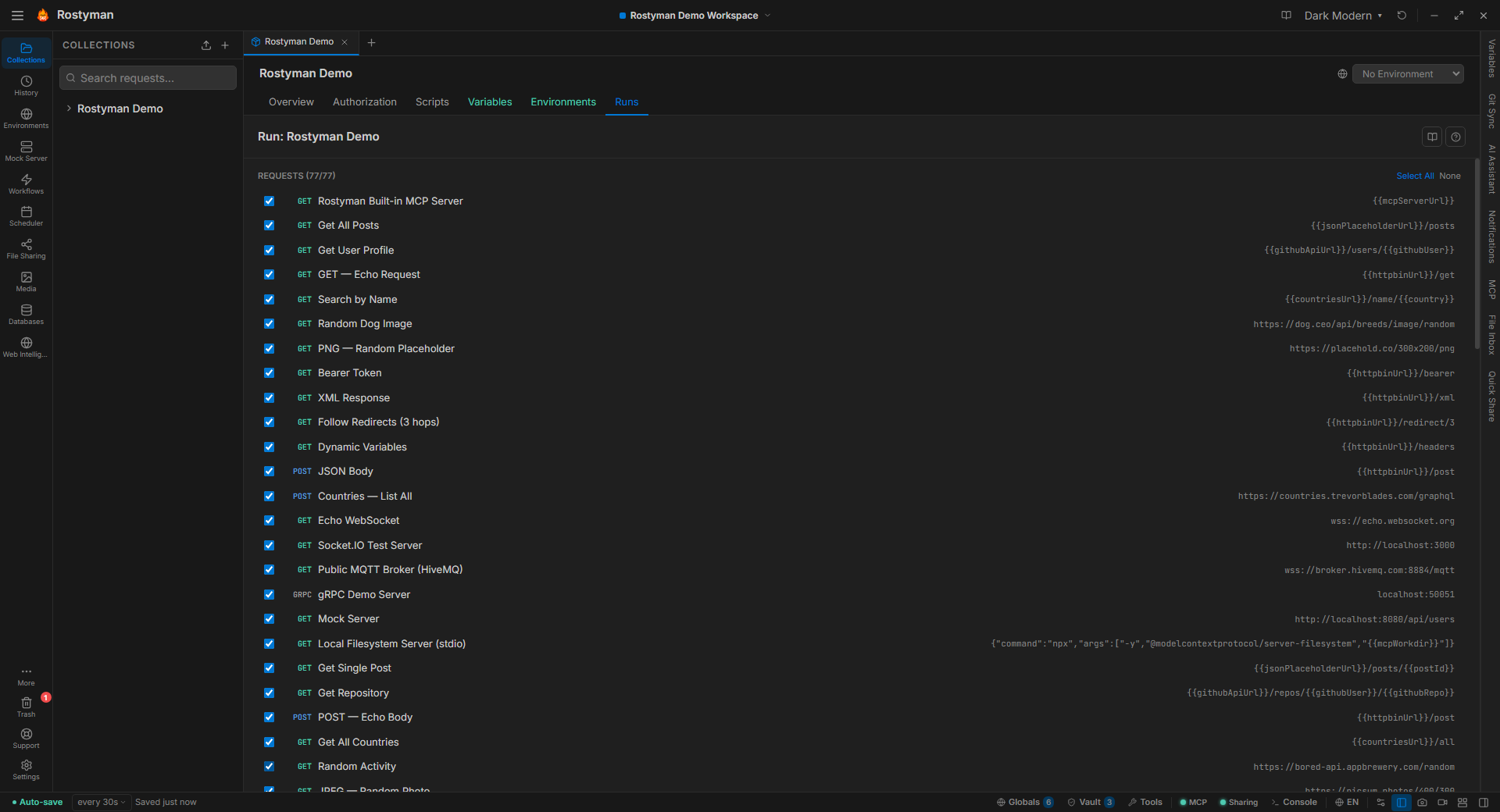
Open the Runner from the status bar (or Ctrl+Shift+R), pick a collection, attach a data file, set iterations — and watch every request stream by with live pass/fail results. Then run the same collection from CI with rosty-cli.
Why this is different
Paid tiers and cloud runs are common in this category. Rostyman's runner is free, local, and identical whether triggered from the GUI or the CLI. The same result artifacts, the same logs, the same exit codes.
Point, click, run the whole thing.
Pick a collection, optionally attach a data file, set iterations and delay. Press Run. Every request executes in the order you set, assertions run, and you get a clean pass/fail report with full response snapshots for every iteration.
- CSV and JSON data files for parameterized runs
- Iteration count and inter-request delay
- Per-request pass/fail with assertion detail
- Export results as JSON
- Rerun only failed requests in one click
users-api
24 requests · 100 iterations · data.csv
Data-driven testing
Attach a CSV or JSON file. Each row becomes one iteration. Columns map to variables available in every request.
rosty-cli for CI
The exact same runner, usable from any shell. Ships with the app — no separate install, no npm required.
Added to your PATH automatically when you install Rostyman.
Database-native
Run by collection name — reads directly from Rostyman's SQLite database. No export step.
rosty-cli run "users-api"Browse collections
List every collection across all workspaces without opening the app.
rosty-cli listCI-ready
Exit code 0 on pass, 1 on failure. JUnit XML output for test dashboards.
--reporters cli,junitSame engine as the app — nothing left behind
rosty-cli runs requests through the app's own engine cores, so a collection behaves identically in CI and in the GUI.
# See all collections in your workspace
$ rosty-cli list
  • users-api          24 requests
  • auth-tests          8 requests
  • payment-flows      16 requests

# Run by name with an environment (loaded from database)
$ rosty-cli run "users-api" --environment "Development"

# Data-driven: each CSV row is one iteration
$ rosty-cli run "users-api" --iteration-data test-data.csv

# Full CI run: JUnit + JSON output, bail on first failure
$ rosty-cli run "users-api" \
    --environment "Staging" \
    --reporters cli,junit,json \
    --reporter-junit-export results.xml \
    --reporter-json-export results.json \
    --bail

✓ POST /users                  142ms
✓ GET /users/:id                87ms
✓ PATCH /users/:id             101ms
✗ DELETE /users/:id     failed: expected 204, got 500
✓ GET /users/search              63ms

Run complete · 23 / 24 passed · 1.8s
Exit: 1
Run flags
--environment <name|file>Environment by name (DB) or JSON file path--iteration-data <file>CSV or JSON for data-driven runs--iteration-count <n>Repeat the collection N times--delay-request <ms>Pause between requests--timeout <ms>Per-request timeout (default 30s)--bailStop on first test failureOutput & CI flags
--reporters cli,json,junitOne or more output reporters--reporter-json-export <f>Write JSON report to file--reporter-junit-export <f>Write JUnit XML to file--db-path <path>Custom DB path (for CI servers)--workspace <name|id>Target a specific workspace--version / --helpVersion info and full usagerostyman.db to the server and pass --db-path /path/to/rostyman.db. Alternatively export the collection to JSON and run it on any machine with Node 22+ — no app install required.Runs on your machine.
No cloud execution engine. No pay-per-run. No limits on iterations. Your CPU is the only ceiling.