SCREEN CAPTURE
LiteCapture, mark up, and record — built right in.
Take screenshots of a region, a window, or the full screen, then annotate them on the spot. Record your screen with audio. All without installing a second app, and without uploading a single byte to the cloud.
Why this is different
Most API clients force you to jump to a separate screen recorder or your OS's native screenshot tool. Every switch breaks the flow. Rostyman captures the moment you hit a 500, right from the response viewer — and the file never leaves your machine.
Three capture modes
Pick the scope you need. Keyboard shortcut opens the picker instantly.
Region
Drag to select any rectangle on screen — the selection overlay appears almost instantly. Confirm or cancel with keyboard. Works across multiple monitors.
App Window
Pick any window from a grid preview. Captures the whole window with rounded corners preserved.
Full Screen
One-click full desktop capture. Auto-detects the active monitor.
Point at the bug, not just the screen.
Open any screenshot from Media and hit the pen icon. Circle the failing field, arrow the wrong status code, highlight the header that matters, add a note — then share it.
- Pen, highlighter, arrow, rectangle and ellipse
- Text with font, size and bold — drag to move, double-click to edit
- Eraser that removes whole strokes, plus crop
- Full undo / redo while you work
- Copy to clipboard, save as a new file, or overwrite the original
Annotation tools
Record your screen without leaving the app.
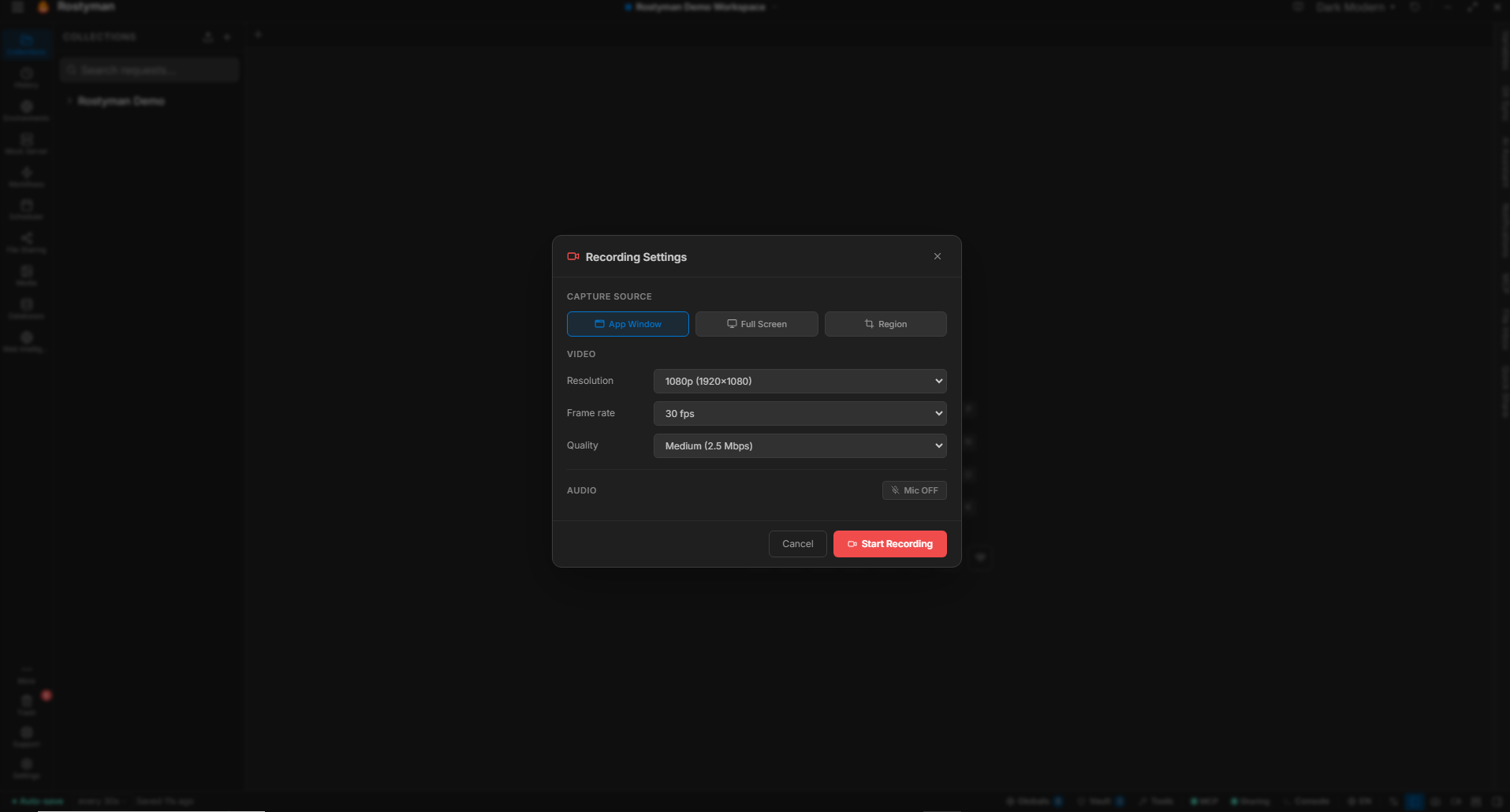
A floating toolbar appears at the top of your screen. A single click starts recording. Pause whenever. Stop with a global shortcut — the app window doesn't even need focus.
- Floating always-on-top toolbar with live timer
- Pause and resume mid-recording
- Custom resolution (up to display native)
- Configurable frame rate (30 / 60 fps)
- Audio capture toggle with bitrate selection
- Ctrl+Alt+R to start recording — fully customizable global shortcut
- Custom global keyboard shortcuts for stop/pause
- Video bitrate control for file size vs quality
- Live language switching for all toolbar labels
Resolution
1920×1080
Frame rate
60 fps
Bitrate
8 Mbps
Audio
On · 192k
Codec
VP8/9
Output
WEBM
Convert WEBM → MP4 — share-ready
Recordings are captured as WEBM for size and quality. When you need to share with someone whose tool of choice is Slack, email, or anywhere else that prefers MP4 — one click converts using the FFmpeg you already have installed on your system.
System FFmpeg detection
No bundled FFmpeg means a smaller installer. If FFmpeg isn't on your PATH, Rostyman shows the right install command for your platform — winget, brew, or apt/dnf/pacman.
Quality presets
Low / Standard / High map to CRF 28 / 23 / 18. Pick by name; the right encoder flags are applied for you.
Resolution presets
Original, 720p, or 1080p. Odd dimensions auto-corrected with a scale filter so the H.264 encoder is happy.
Audio toggle + bitrate
Strip audio for silent demos, or keep it at the original bitrate.
Live progress bar
Real-time progress with elapsed and ETA — not a frozen "converting…" toast.
Full FFmpeg log on failure
If the conversion fails, the dialog surfaces the actual FFmpeg error message in an expandable panel — with a Copy button so you can paste it into a search.
Trigger shortcuts that stay out of your way
Fire a capture without ever touching the mouse. Every shortcut is customizable in Settings → Screen Recording — including a “Capture immediately” toggle. Stop and pause work even when Rostyman is minimized, and screenshots copy to the clipboard straight from the media viewer.
Instantly capture the full screen under the cursor — no picker, no mouse movement, no confirmation step. Perfect for grabbing hover-only menus, dropdowns, and tooltips that vanish the moment you reach for the mouse.
Take a screenshot — opens the region / window / full-screen picker.
Start recording — kicks off screen capture from anywhere.