WORKFLOW
LiteAutomate complex API flows visually.
Build sophisticated API workflows with a drag-and-drop visual editor. Chain requests, add conditions, loops, transforms, and retry logic — without writing orchestration code.
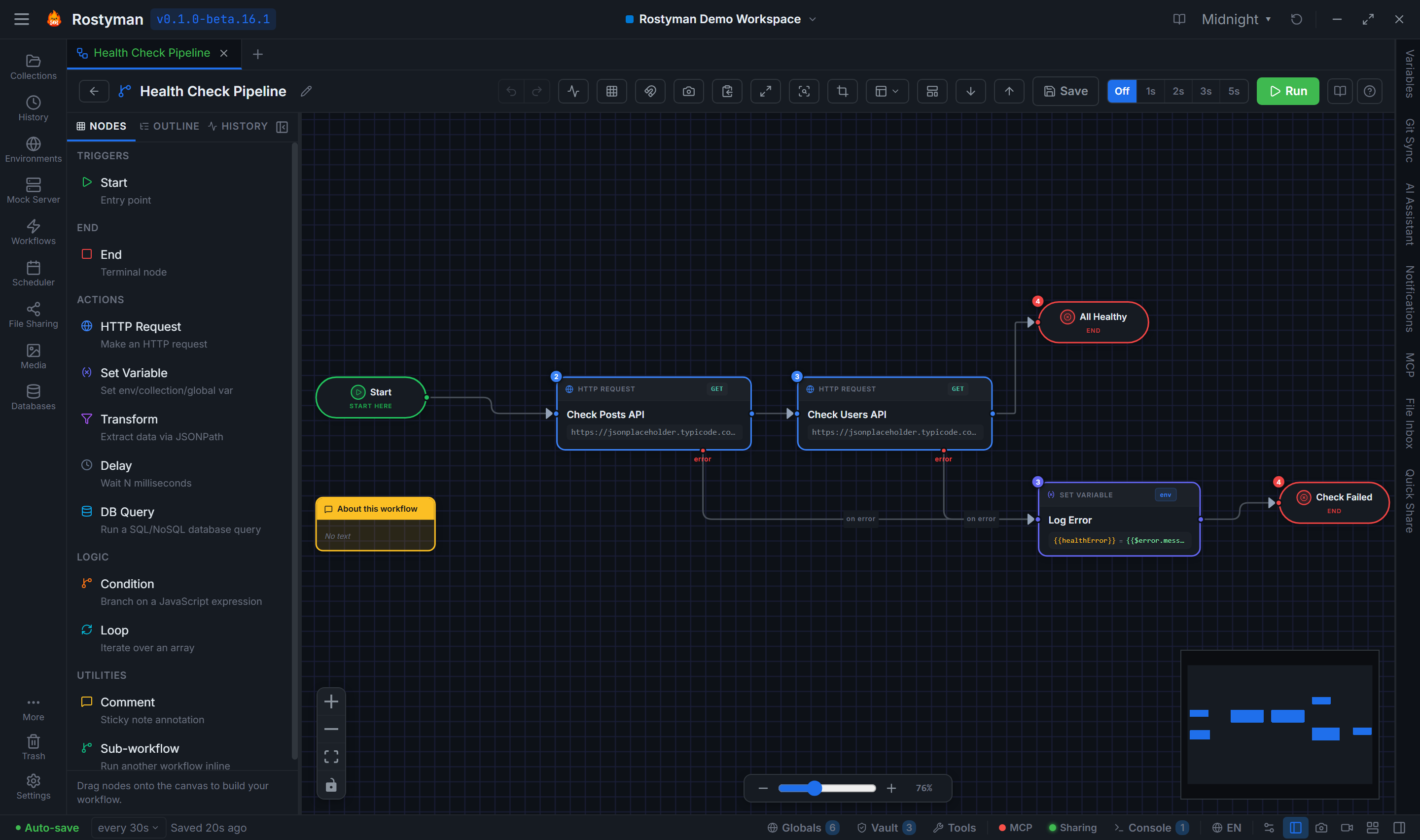
12 node types
Everything you need to model real-world API workflows.
Entry point for every workflow. Configure manual trigger or schedule.
Marks the successful end of a workflow path.
Send any HTTP request. Inherits auth from collection or configures its own.
Branch on response data. THEN (pass) and ELSE (fail) output edges.
Iterate over an array from a previous response. Sub-flows run per item.
Extract, reshape, or compute values from response data using jq-style expressions.
Wait a fixed number of milliseconds before proceeding.
Write a value into collection, environment, or global variables for downstream nodes.
Run a SQL or NoSQL query against any saved database connection. Use results in downstream nodes.
Run a saved Web Intelligence browser test as a workflow step. Fail the workflow if the test fails.
Reuse another workflow as a node. Circular reference guard prevents infinite loops.
Add documentation notes directly on the canvas.
A canvas built for power users
Undo / Redo (50 steps)
Every node placement, deletion, and edge change is tracked. Ctrl+Z / Ctrl+Y navigate the full history.
Auto-layout
Four layout directions: Left→Right, Right→Left, Top→Bottom, Bottom→Top. One-click auto-arrangement of your entire canvas.
Zoom + Pan + Fit to View
Scroll to zoom, drag to pan, Ctrl+0 to fit the entire workflow in view. Keyboard-friendly navigation.
Snap to Grid (20px)
Nodes snap to a 20px grid for clean, aligned diagrams.
Export canvas
Save your workflow as PNG (high-res screenshot) or JSON (.rostyman-workflow) for backup and sharing.
Step badges
BFS-computed step numbers on every node — see the execution order at a glance.
Fullscreen mode
Click Maximize in the header to expand the canvas edge-to-edge. Press Escape to return to normal layout.
MiniMap
Drag the viewport rectangle in the corner to pan large workflows; scroll to zoom. Themed to match your Rostyman theme.
Zoom to Area
Click the crop icon, drag a rectangle, release — the canvas zooms to fit the selection. Esc cancels.
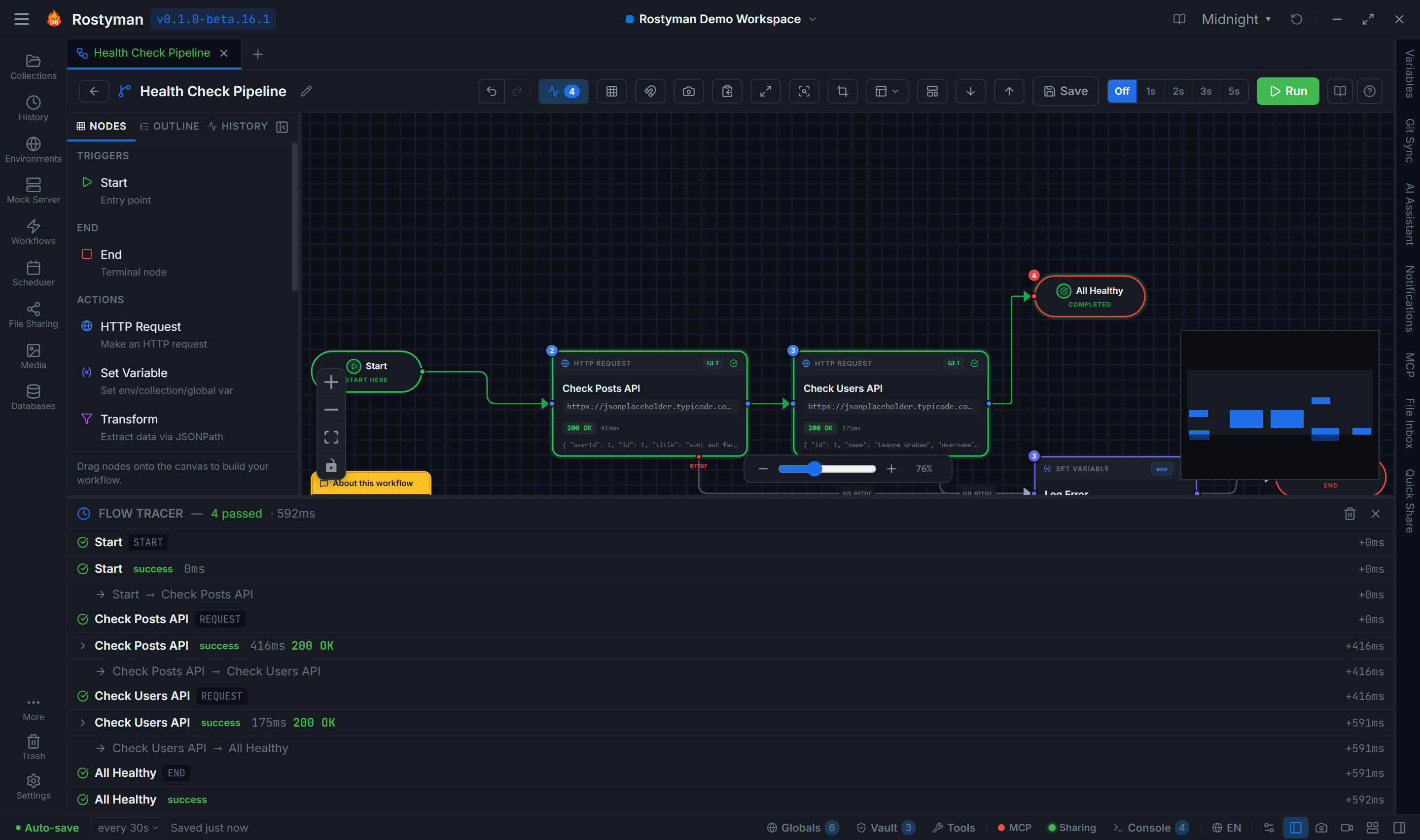
Flow Tracer — replay any past run
Every workflow run is saved automatically. Open History on any workflow and replay step-by-step — see what data flowed through each node, what each request returned, and exactly where things went wrong.
Final-status icons
Each row shows its actual outcome — success, error, skipped — once a run completes. No perpetual spinners on past runs.
Delay duration in trace
Delay rows render "waiting 5000ms…" while running and "waited 5000ms" once complete, so you can tell whether a wait is active.
Per-node input + output
Click any row to see what arrived and what left — full request, full response, and any variables the node wrote.
Stop mid-run
Stop interrupts immediately, even during a long Delay. Aborts the running request and unwinds cleanly.
Trace persistence
Runs are stored in your local database — search, filter, and delete from the History tab on the workflow.
Included in Lite
All of these are included in the free Lite tier, forever.
Retry logic
Configure retry count, delay, backoff strategy (linear/exponential), and which HTTP status codes should trigger a retry.
Response assertions
9 assertion operators: equals, not equals, greater than, less than, ≥, ≤, contains, exists, and inRange. Assert on status, body, headers, and response time.
Error handling edges
Every node has an onError output edge. Route failures to retry nodes, logging requests, or graceful exit paths.
Run history with trace replay
Every workflow run is saved. Replay any run step-by-step and inspect each node's input/output from the History tab.
Import / Export
Share workflows as .rostyman-workflow JSON files. Import from file or URL. Works across different Rostyman installations.
5 bundled templates
Start from a working workflow and customize from there.
Health Check Monitor
Poll a set of endpoints on a schedule and alert on non-2xx responses.
Data Pipeline
Fetch data from one API, transform it, and POST it to another.
Auth Flow
Full OAuth2 token fetch + refresh cycle with environment variable injection.
CRUD Operations
Create → Read → Update → Delete test sequence with assertions at each step.
Retry with Backoff
Retry a flaky endpoint up to 5 times with exponential delay between attempts.
Build your first workflow in minutes
Free download — the workflow editor is fully included in Rostyman Lite.
Download Free